# Example: Real-World System (Context + Container)
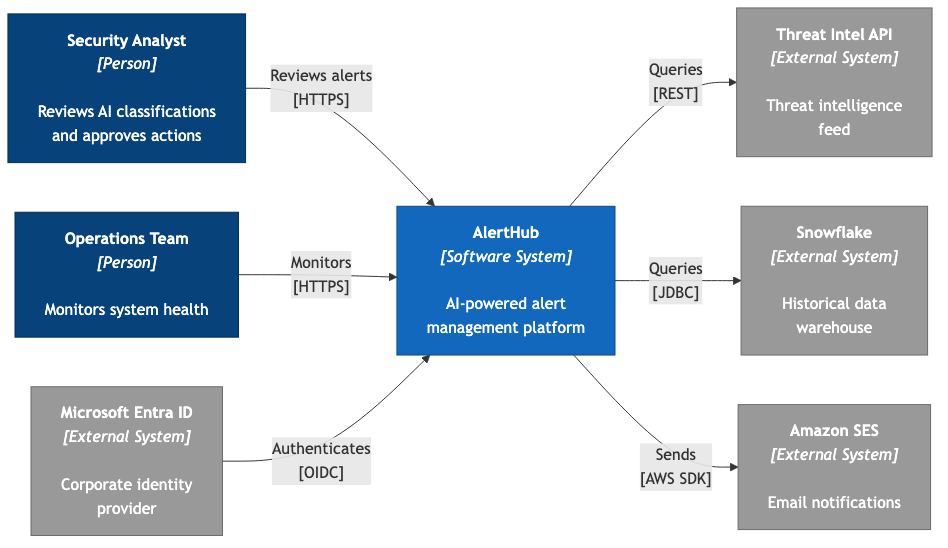
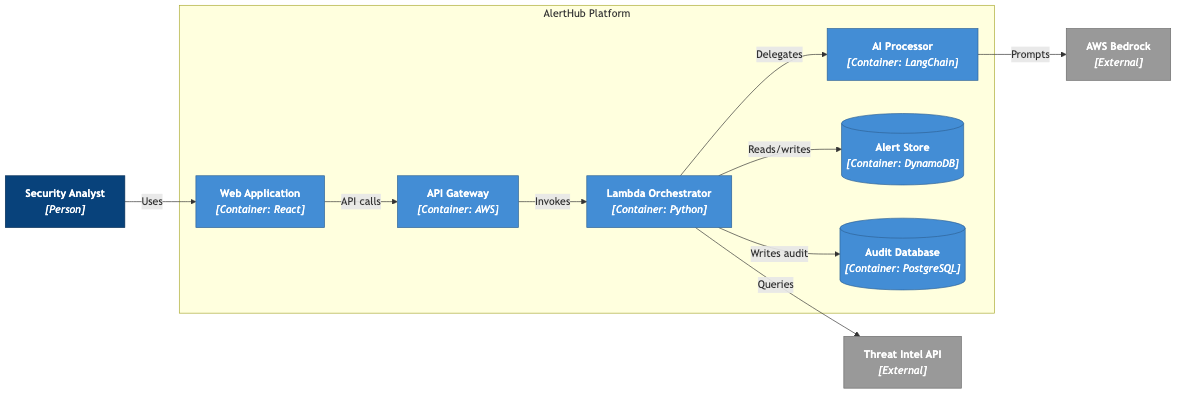
This example shows a complete real-world system diagrammed at two C4 levels — Context (Level 1) and Container (Level 2). The system is an AI-powered alert management platform.
## Context Diagram (Level 1)
### The Prompt
```
/c4-diagram AlertHub context flowchart
System: AlertHub
Description: AI-powered alert management platform
Actors:
- Security Analyst: Reviews AI classifications and approves actions
- Operations Team: Monitors system health
External systems:
- Microsoft Entra ID: Corporate identity provider (incoming, OIDC)
- Threat Intel API: Threat intelligence feed (outgoing, REST)
- Snowflake: Historical data warehouse (outgoing, JDBC)
- Amazon SES: Email notifications (outgoing, AWS SDK)
Requirements:
- Use flowchart LR with C4 styling
- Maximum 0 edge crossings
```
### The Result
```mermaid
flowchart LR
Analyst["Security Analyst
[Person]
Reviews AI classifications
and approves actions"]
Ops["Operations Team
[Person]
Monitors system health"]
AlertHub["AlertHub
[Software System]
AI-powered alert
management platform"]
Entra["Microsoft Entra ID
[External System]
Corporate identity
provider"]
ThreatAPI["Threat Intel API
[External System]
Threat intelligence
feed"]
Snowflake["Snowflake
[External System]
Historical data
warehouse"]
SES["Amazon SES
[External System]
Email notifications"]
Analyst -->|"Reviews alerts
[HTTPS]"| AlertHub
Ops -->|"Monitors
[HTTPS]"| AlertHub
Entra -->|"Authenticates
[OIDC]"| AlertHub
AlertHub -->|"Queries
[REST]"| ThreatAPI
AlertHub -->|"Queries
[JDBC]"| Snowflake
AlertHub -->|"Sends
[AWS SDK]"| SES
classDef person fill:#08427B,stroke:#052E56,color:#fff
classDef system fill:#1168BD,stroke:#0B4884,color:#fff
classDef external fill:#999999,stroke:#6B6B6B,color:#fff
class Analyst,Ops person
class AlertHub system
class Entra,ThreatAPI,Snowflake,SES external
```
### Why This Works
- **8 elements** — within the recommended maximum of 10
- **Two actors** on the left, system in the middle, four external systems on the right
- **Mixed relationship directions** — Entra authenticates *into* the system (incoming), while the system queries *out* to Threat Intel API, Snowflake, and SES (outgoing)
- **Protocol labels** show the technology: HTTPS, OIDC, REST, JDBC, AWS SDK
- **Zero crossings** despite 6 relationships
---
## Container Diagram (Level 2)
### The Prompt
```
/c4-diagram AlertHub container flowchart
System: AlertHub Platform
Actor:
- Security Analyst: Uses the system
Containers (inside the system boundary):
- Web Application (React): User interface
- API Gateway (AWS): Request routing
- Lambda Orchestrator (Python): Workflow coordination
- AI Processor (LangChain): Classification engine
- Alert Store (DynamoDB): Alert data
- Audit Database (PostgreSQL): Audit trail
External systems:
- AWS Bedrock: LLM inference (outgoing)
- Threat Intel API: Threat intelligence (outgoing)
Requirements:
- Use flowchart LR with C4 styling
- Group containers in a subgraph boundary
- Maximum 0 edge crossings
```
### The Result
```mermaid
flowchart LR
Analyst["Security Analyst
[Person]"]
subgraph AlertHub["AlertHub Platform"]
direction LR
WebUI["Web Application
[Container: React]"]
APIGW["API Gateway
[Container: AWS]"]
Orch["Lambda Orchestrator
[Container: Python]"]
AIProc["AI Processor
[Container: LangChain]"]
DynamoDB[("Alert Store
[Container: DynamoDB]")]
RDS[("Audit Database
[Container: PostgreSQL]")]
end
Bedrock["AWS Bedrock
[External]"]
ThreatAPI["Threat Intel API
[External]"]
Analyst -->|"Uses"| WebUI
WebUI -->|"API calls"| APIGW
APIGW -->|"Invokes"| Orch
Orch -->|"Delegates"| AIProc
AIProc -->|"Prompts"| Bedrock
Orch -->|"Reads/writes"| DynamoDB
Orch -->|"Writes audit"| RDS
Orch -->|"Queries"| ThreatAPI
classDef person fill:#08427B,stroke:#052E56,color:#fff
classDef container fill:#438DD5,stroke:#2E6295,color:#fff
classDef database fill:#438DD5,stroke:#2E6295,color:#fff
classDef external fill:#999999,stroke:#6B6B6B,color:#fff
class Analyst person
class WebUI,APIGW,Orch,AIProc container
class DynamoDB,RDS database
class Bedrock,ThreatAPI external
```
### Why This Works
- **9 elements** — within the recommended maximum of 10
- **System boundary** (subgraph) clearly separates internal containers from external dependencies
- **Main flow** reads left-to-right: Analyst -> Web -> API -> Orchestrator -> AI Processor -> Bedrock
- **Branch relationships** — Orchestrator also writes to DynamoDB, RDS, and queries Threat Intel API
- **Database shapes** — DynamoDB and PostgreSQL use cylinder notation `[("...")]`
- **Technology labels** — each container shows its implementation technology
## Lessons from Real-World Diagrams
### Handling Mixed Technologies
This system uses React, AWS services, Python, LangChain, DynamoDB, and PostgreSQL. The C4 model handles this gracefully — each container declares its technology in the label, letting readers quickly assess the tech stack.
### AI + Traditional Components
The AI Processor is just another container. It connects to AWS Bedrock (an external LLM service) exactly like any other external dependency. Do not treat AI components as special — they follow the same C4 patterns.
### Multiple Data Stores
Systems often have multiple databases for different purposes (transactional data vs. audit trail). Show each as a separate container with its specific purpose, not a generic "Database" label.
### Branching from a Central Service
The Lambda Orchestrator connects to 4 different targets. When one service has many outgoing relationships, position it centrally and let relationships fan out. The tier-based declaration order naturally achieves this.
---
**Related skills:**
- [`/c4-diagram`](../../skills/diagramming/c4-diagram.md) — generates both Context and Container levels
- [`/diagram-review`](../../skills/diagramming/diagram-review.md) — analyses existing diagrams for readability