# Example: C4 Container Diagram
A C4 Container diagram (Level 2) zooms into a system boundary to show its **major containers** — applications, services, databases — and how they interact. It answers: "What runs inside the system?"
## The Prompt
```
/c4-diagram OrderPlatform container flowchart
System: Order Platform
Actor:
- Customer: Uses the system
Containers (inside the system boundary):
- Web App (React): Customer interface
- API Gateway (Kong): Routes requests
- Order Service (Python): Order logic
- Inventory Service (Python): Stock management
- Database (PostgreSQL): Order data
External systems:
- Payment Gateway: Processes payments (outgoing, REST)
Requirements:
- Use flowchart LR with C4 styling
- Group containers in a subgraph boundary
- Persons in dark blue (#08427B)
- Containers in medium blue (#438DD5)
- External systems in grey (#999999)
- Maximum 0 edge crossings
```
## The Result
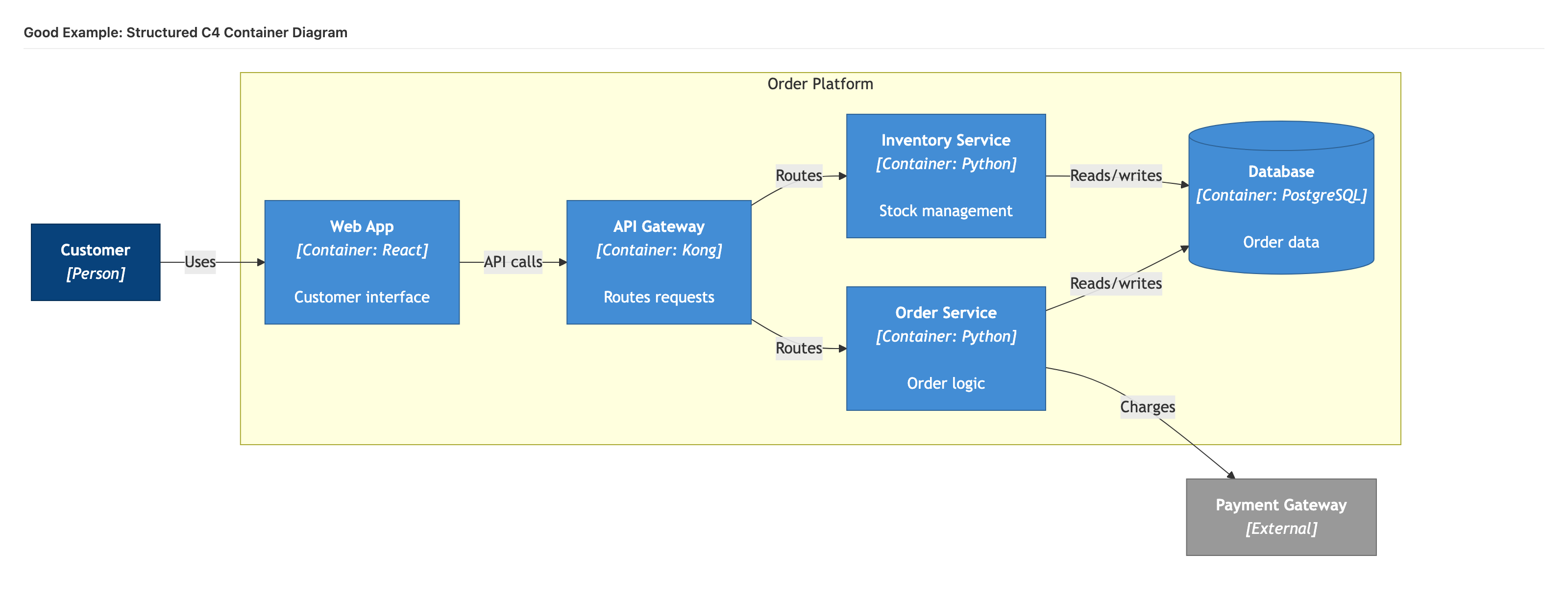
```mermaid
flowchart LR
User["Customer
[Person]"]
subgraph Platform["Order Platform"]
direction LR
Web["Web App
[Container: React]
Customer interface"]
API["API Gateway
[Container: Kong]
Routes requests"]
Orders["Order Service
[Container: Python]
Order logic"]
Inventory["Inventory Service
[Container: Python]
Stock management"]
DB[("Database
[Container: PostgreSQL]
Order data")]
end
Payment["Payment Gateway
[External]"]
User -->|"Uses"| Web
Web -->|"API calls"| API
API -->|"Routes"| Orders
API -->|"Routes"| Inventory
Orders -->|"Reads/writes"| DB
Inventory -->|"Reads/writes"| DB
Orders -->|"Charges"| Payment
classDef person fill:#08427B,stroke:#052E56,color:#fff
classDef container fill:#438DD5,stroke:#2E6295,color:#fff
classDef database fill:#438DD5,stroke:#2E6295,color:#fff
classDef external fill:#999999,stroke:#6B6B6B,color:#fff
class User person
class Web,API,Orders,Inventory container
class DB database
class Payment external
```
## What Makes This Good
### System Boundary
The `subgraph` groups all internal containers, making the system boundary immediately visible. This exploits the **Gestalt principle of proximity** — elements inside the boundary are perceived as part of the same system.
### Tier-Based Declaration Order
Inside the boundary, containers follow the architectural flow:
1. **Web App** (presentation) — leftmost inside boundary
2. **API Gateway** (routing layer)
3. **Order Service** (business logic)
4. **Inventory Service** (business logic)
5. **Database** (data layer) — rightmost inside boundary
### Technology Labels
Each container includes its technology stack: `[Container: React]`, `[Container: Python]`, `[Container: PostgreSQL]`. This tells the reader both *what it does* and *how it is built*.
### Database Shape
The database uses Mermaid's cylinder notation `[("...")]` which visually distinguishes data stores from application containers. Use this for any element whose technology contains: PostgreSQL, MySQL, DynamoDB, Redis, MongoDB, S3, Snowflake.
### Clean Flow
Data flows consistently left-to-right: User → Web → API → Services → Database/External. No backtracking, no crossings.
## Scaling Up
When a container diagram has more than 10 elements:
- Show only the 6-8 most critical containers
- Add a note listing omitted containers
- Consider splitting into multiple diagrams by domain
## PlantUML Alternative
For complex container diagrams with persistent crossings, PlantUML provides directional hints:
```plantuml
@startuml
!include https://raw.githubusercontent.com/plantuml-stdlib/C4-PlantUML/master/C4_Container.puml
LAYOUT_LEFT_RIGHT()
LAYOUT_WITH_LEGEND()
title Container Diagram for Order Platform
Person(user, "Customer", "Uses the system")
System_Boundary(boundary, "Order Platform") {
Container(web, "Web App", "React", "Customer interface")
Container(api, "API Gateway", "Kong", "Routes requests")
Container(orders, "Order Service", "Python", "Order logic")
Container(inventory, "Inventory Service", "Python", "Stock management")
ContainerDb(db, "Database", "PostgreSQL", "Order data")
}
System_Ext(payment, "Payment Gateway", "Processes payments")
Rel_Right(user, web, "Uses", "HTTPS")
Rel_Right(web, api, "API calls", "REST")
Rel_Down(api, orders, "Routes")
Rel_Down(api, inventory, "Routes")
Rel_Right(orders, db, "Reads/writes", "SQL")
Rel_Right(inventory, db, "Reads/writes", "SQL")
Rel_Right(orders, payment, "Charges", "REST")
Lay_Right(orders, inventory)
@enduml
```
The `Rel_Right`, `Rel_Down`, and `Lay_Right` hints give you deterministic control over element placement that Mermaid cannot provide.
---
**Related skills:**
- [`/c4-diagram`](../../skills/diagramming/c4-diagram.md) — generates C4 diagrams from system parameters
- [`/diagram`](../../skills/diagramming/diagram.md) — general diagram generation with format selection guide